
Join the Dari Q community
Every new account requires HOA approval before activation. Ownership and occupancy records are linked to the building and apartment number.
Frequently asked questions
Answers about Dari Q services. Choose a topic, then open a question to read its answer.
Resident guide and app installation · Still need help? Contact the right team
Handover and deposit
How do I dispute an inspection?
Open your booking record and choose Comment / dispute to PM. Select the item and quantity or locations, explain the concern and attach a photo. Send it to PM, then escalate to HOA if unresolved. The record retains dates and replies.
When are handover photos required?
At initial handover, photos are optional when there are no defects. They are required when a pre-existing defect or shortage is recorded. Return-inspection photos remain required.
Must I receive the full furniture inventory?
No. Reception records the actual quantities issued, including zero. Return inspection compares with those quantities, not the venue’s entire inventory.
How are existing defects and new damage recorded?
Reception records conditions and quantities at handover and return. Initial photos are required for pre-existing defects; return-inspection photos are always required. You can add your own photos, observations and quantities. Pre-existing defects and shortages are not charged; deductions must relate to documented new issues and be approved by the PM.
Who returns the deposit and how can I track it?
After PM authorization, reception handles handover, inspection and cash deposit receipt/refund. With no new issue, the deposit can be returned immediately after key return and inspection. An issue holds the refund for the PM’s decision; the balance is due within one week of key return. Confirm receipt in your booking record only after receiving the cash. HOA oversees all records, and unresolved concerns can be escalated to it.
Accounts and residency
How can I correct a registration mistake?
Contact the HOA with the mistake and the correct value. The HOA can correct pending or approved registration details after checking them. The history retains the before/after values, editor, role, time and reason. You receive a detailed email and can review your correction history on the portal home page after signing in. Corrections do not transfer ownership or change residency rights.
What happens to my documents after verification?
Required reference numbers and information remain in your account record. After approval and verification of the saved information, eligible registration evidence copies are removed from the current portal. Pending, incomplete or held evidence is retained for review. Rejected or withdrawn copies become eligible after 30 days from the recorded decision. This does not include backups or earlier downloads. Instead of uploading, you can choose to show originals to the property manager without providing copies, followed by HOA approval. See the privacy notice for current settings and details.
Who can register?
Owners and tenants can apply separately with supporting documents. Every new account needs HOA approval before activation. Tenants can apply even if the owner has not registered.
How do I change from resident owner to landlord, or move back in?
Open the apartment record and request a residency-status change with the move date and details. Owners do not need a National Address certificate. HOA approves on or after the move date and checks for conflicting tenancies before a return. Former household members are not automatically reactivated.
How do I renew my rental contract, and what happens at expiry?
An email reminder is scheduled seven days before expiry. Submit the updated official Ejar contract and its dates through Renew rental contract. After expiry, you can still sign in to submit and track renewal, but resident services, visitors and bookings remain restricted until HOA approves the new contract and its period is active. Uploading alone does not restore services.
Which documents are required?
Owners: ID and ownership deed; no National Address certificate is required. Tenants: ID, National Address certificate and official Ejar contract with start and end dates. Choose uploaded copies directly to HOA or show originals to the property manager without providing copies, followed by final HOA approval.
How do I select my apartment?
Choose the building and full apartment code from the list, such as A101. The first letter identifies the building, followed by the floor code and apartment number. M means mezzanine and R means roof. Select the apartment before submitting.
My application is pending. What should I do?
Wait for HOA review and check your application status and email. Uploading documents does not activate the account automatically. Use the HOA contact below for approval questions.
Can I register several apartments or co-ownership?
Yes. An owner submits a separate application for each apartment using the same account. Each co-owner applies through their own account. The HOA reviews each application; the free booking allowance belongs to the apartment and does not multiply with the number of owners.
How do I add someone who lives with me?
Under My units, request an additional household member. Enter their name and relationship or residency type, and provide ID and National Address certificate by upload or in-person inspection. They must actually live there, including live-in drivers or domestic workers. Once approved, reception can find them; this does not automatically create a separate login account.
Does an owner keep access after renting out the apartment?
The owner keeps their account, HOA notifications and access to visit their apartment, but cannot use facilities or book venues during the tenancy. Facility eligibility belongs to the approved tenant during active occupancy. Tenant renewal requires approval, and the HOA reviews an owner’s return to residency.
Bookings and events
Which venues can I book and what are the fees?
Online booking covers the event hall, lounge and outdoor area. For the hall and lounge only, each apartment gets one free booking per venue each year, renewing on January 1; later bookings cost SAR 500. Eid periods and December 31 always cost SAR 500 without using the free allowance. Hall/lounge bookings require a SAR 2,000 cash deposit at handover. Outdoor bookings cost SAR 500 for the apartment’s first booking of the year, then SAR 1,000, with no free booking and a SAR 3,000 deposit. Review the displayed amount and rules before submitting.
When do I collect and return the venue?
Handover is at 10 AM and return is by 9 AM the next day, Saudi time. Choose guest arrival and departure within the booking period.
Does uploading a transfer receipt confirm my booking?
No. For paid fees, upload the receipt within 24 hours of requesting the booking. The property manager verifies receipt of the funds. Check My bookings and wait for Confirmed before relying on the reservation.
How do I cancel a booking?
Open the booking, choose cancellation and enter the reason. At least 48 hours before handover, cancellation is automatic and restores the free allowance or makes the paid fee refundable after bank verification. Later cancellation requests go to the HOA. Check the booking status and any refund due.
When is the deposit returned?
The deposit is returned in cash after inspection, less any required deductions. With no damage, it can be returned immediately after receiving the key and completing inspection. If damage is found, the remaining balance is returned within one week of key return, with deductions and reasons recorded.
Can a tenant book consecutive days?
A tenant cannot book the same venue on consecutive days. Booking the hall one day and the lounge the next is permitted.
Can my event use outdoor seating or equipment and decorations outside the venue?
A hall/lounge booking does not include outdoor space. A separate outdoor reservation covers Area 1, with optional Area 2 at no extra charge. In every case, the event, its guests, carts, games, equipment, activities and decorations must stay inside the booked venue. Guests may not use seating or areas outside their booking boundary for the event. Popcorn carts and inflatables are examples of equipment that must stay within the booked boundary. Inform your guests and ensure they comply.
Must I register every event guest separately?
No. After confirmation, open Event guest invitation, enter the event name, expected guest count and arrival/departure times within the booking. Save and share the same invitation link or QR with everyone. The count is for reception planning, not an entry counter or capacity approval.
Visitors and entry passes
How do I register an ordinary visitor?
Open Visitors and select the apartment, visitor name, arrival/departure times and arrival method, including the plate for a vehicle. After submitting, open View and share QR pass. The visitor does not need an account to open it.
Can a guest leave and return?
Yes, within the permitted window. Reception scans and checks online again on return. Expiry or cancellation of the visit or booking invalidates the pass. Editing an event invitation invalidates its old QR; share the new invitation.
Why does my pass say unavailable or not yet valid?
Check the Saudi date/time, cancellation status and the host’s account and residency eligibility. Entry is not permitted before the start or at/after expiry. Reception must scan and check the live result; a saved image alone does not prove validity.
Do I need Apple Wallet or Google Wallet?
No. Open the pass or invitation link on your phone and show its QR to reception. Sharing works from the website and installed app; a Wallet app is not required.
App, notifications and help
How do I install the app?
On iPhone, open Dari Q in Safari, choose Share, then Add to Home Screen. On Android, open the website in Chrome and choose Install app or Add to Home screen from the menu. Use your website account; detailed steps are in the resident guide.
What if I cannot submit a form or sign in?
Check required fields, especially the apartment, and any message near Submit. If the form expired, reload and try again. Check whether your request exists before submitting twice. Use the sign-in page’s reset link for a forgotten password. If the problem persists, contact technical support with the steps and error.
How do I enable notifications?
Open the installed app and sign in, then choose Enable notifications and Allow. Repeat on each device. If previously denied, change the notification permission in phone or browser settings. When management enables announcement delivery, approved owners and active tenants receive email and their opted-in devices receive push notifications.
How do I report and follow up on maintenance?
Use Resident reports, choose the apartment and location, and describe the problem. The PM reviews scope and handles the issue or assigns O&M. Resolution requires photos, an explanation and PM verification before closure. Private-apartment issues are closed outside scope with a reason. Follow status and replies; reopen the ticket if the problem remains. If unresolved, use escalation when available to involve the HOA. Reports are not an emergency channel.
How do I report a website or app error?
Open Technical support, select the service and describe your steps and the error. You may attach a screenshot after hiding personal information. Follow the request reference and replies in the portal. If unable to sign in, email techsupport@dari-q.com. Email replies are not automatically added to the ticket history.
What if an email has not arrived?
Check Inbox and Spam and confirm your account email address. Check your request’s status in the portal too. Email and push notifications may be delayed; contact technical support if the problem continues. Never share passwords or verification codes.
Apartments and shops for rent and sale
How do I list my apartment or shop?
From an approved owner account, open My property listings, select the apartment or shop, add details, photos and price, then submit for review. Publication requires PM approval.
What is the commission and when is it due?
The owner pays 2.5% of first-year rent or the final sale price when the agreement is completed, not merely on enquiry. The PM reviews agreement, invoicing and collection terms.
How do I request a viewing?
Open the public listing and submit your contact details and viewing request. The PM coordinates with the owner and occupant. A request is not a confirmed appointment or a building entry permit.
Can I change or withdraw a listing?
Yes, under My listings. Editing returns the listing to PM review before republication. Completing a rental or sale does not automatically change resident accounts or access rights.
Sign-in, verification and privacy
Which sign-in choice should I use?
Open dari-q.com. Choose Owner or tenant login for resident services, Staff website login for HOA, PM, reception or O&M, and Staff email login for Microsoft 365 in a separate page. Email and website accounts are separate.
Does an owner need National Address proof?
No owner needs a National Address certificate, whether resident or renting out. Tenants and additional household residents need ID and National Address proof; tenants also need the official Ejar contract and its dates. Added residents must actually live there, with relationship or residency type, such as a live-in driver or domestic worker.
How does in-person verification work?
Choose document uploads for direct HOA review, or in-person verification: show originals to the PM without supplying copies. In-person applications first go to PM to verify information and entitlement, then to HOA for final approval. PM verification does not activate the account.
What remains after uploaded files are removed?
Removal from the current portal does not erase account information, bookings or audit history, and does not establish deletion of hosting backups or previous downloads. Read the privacy notice; no system guarantees that a leak cannot occur.
When will I receive confirmation of copy removal?
HOA verifies evidence against saved details before removing eligible copies after approval. Pending, incomplete or held copies remain for review. Rejected or withdrawn copies become eligible after 30 days from the recorded decision. A confirmation is emailed after successful removal; approval alone is not proof of deletion.
How do I request a correction or exercise privacy rights?
Open Privacy and personal data to request access/a copy, correction, erasure, withdrawal of consent where applicable, or to raise a question. Explain without attaching an ID and keep the P- reference. HOA verifies identity and reviews the request; submission does not automatically erase anything. If unable to sign in, contact hoa@dari-q.com.
Which two-factor options are available?
Under Account security — two-factor authentication, residents may choose an authenticator app or email codes and keep recovery codes securely. Staff providers are authenticator apps and recovery codes, not email, SMS or WhatsApp. PM/reception setup and universal staff enforcement remain deferred for training; do not assume every account has two-factor protection.
Why did PM verification not activate my account?
Choose document uploads for direct HOA review, or in-person verification: show originals to the PM without supplying copies. In-person applications first go to PM to verify information and entitlement, then to HOA for final approval. PM verification does not activate the account.
Did not find your answer?
Choose the right team below. An email link opens a message for you to write and send; nothing is sent automatically. Use portal forms to submit and track requests.
- Bookings, transfers and maintenance: property manager — pm@dari-q.com
- Visitors and entry enquiries: reception — reception@dari-q.com
- Account/residency approvals and escalation: HOA — hoa@dari-q.com
- Website and app errors: technical support — techsupport@dari-q.com
Do not email passwords, verification codes or identity documents. Use the designated upload forms for required documents. These channels are not for emergencies; contact security or the appropriate emergency service directly for urgent danger.
Hall and lounge bookings at Eid and New Year
- Eid al-Fitr and Eid al-Adha: days 1–7 inclusive, plus any adjoining Friday–Saturday weekend before or after. The whole period opens for booking 14 days before Eid day 1 at 00:00 Saudi time. All bookings cost SAR 500 and do not use the free allowance.
- December 31 always costs SAR 500 and opens on December 18 at 00:00 Saudi time, 14 days before January 1. The cash deposit and 24-hour pre-handover booking cutoff still apply.
- Eid dates use Umm al-Qura; the property manager corrects them when the announced date differs. The period and opening date then change for new bookings. Existing reservations keep their booked dates and agreed fees, with affected bookings flagged for review.
How-to videos
Shop-owner registration and access restrictions
Shop owners may register for ownership and account approval only. Shop ownership grants no access to parking, venues, gyms, pools, outdoor areas or any residential facilities.
In the owner form, choose Shops and shop number 1 to 6, and attach ID and ownership deed. HOA approval is required. A shop cannot be used to add residents or issue residential visitor passes.
Register the shop tenant
An owner who rents out a shop must submit the tenant application from the approved shop record. Choose individual or company, provide the name, contact details and lease dates, and attach ID and the tenancy contract. For a company, provide its authorized representative’s name, ID and contact details. The HOA reviews the application; registration grants no residential facility or parking rights.
List a shop for rent or sale
An approved shop owner can submit a listing under My property listings. It is clearly identified as a commercial shop and published after PM review, under the same commission terms: 2.5% of first-year rent or final sale price on completion. Listing or completing the transaction grants no residential facility or parking rights.
Outdoor seating reservations
Only the red-outlined areas are reservable. Starbucks marks north (left on the plan). Area 2 has no stated measurement on this drawing.
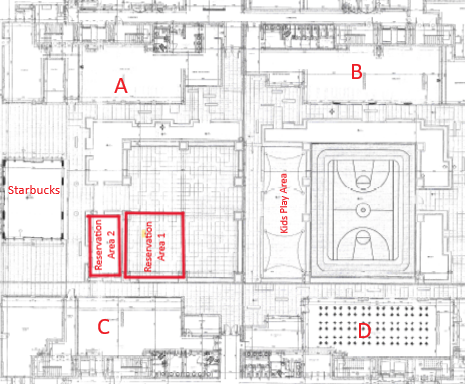
- Area 1 is the main red-outlined space on the plan (approximately 49 m²). Adjacent Area 2, toward Starbucks to the north, is optional at no extra fee or deposit and cannot be booked independently. The reservation does not cover all outdoor seating.
- One reservation per date, from 12 noon until midnight, Saudi time. Quiet hours begin at 8 PM; guests may stay, but no loud noises of any kind are permitted. Do not disturb residents at any time.
- No apartment has a free outdoor booking. The first outdoor booking per apartment per Gregorian year costs SAR 500; later bookings cost SAR 1,000. This count is separate from the hall and lounge and uses the event year. Cancelled, expired and rejected reservations are excluded; existing reservations keep their agreed fees.
- Book no more than 30 days ahead; booking closes 24 hours before the start. Eid and New Year opening restrictions also apply; outdoor fees remain SAR 500 or SAR 1,000 according to the booking count.
- Upload booking-fee transfer evidence within 24 hours. The property manager must verify receipt before confirmation. A refundable SAR 3,000 cash deposit is required before using the area and recorded by staff at handover.
- Cancellation at least 48 hours before the start makes the full paid venue fee refundable after bank verification. Management reviews later requests. After return and inspection, the cash deposit can be refunded immediately if there is no damage; if damage is found, the balance after deductions is returned within one week with reasons recorded.
- HOA-provided seating is limited to capacity for 20 people; sofas and shared seats count by person capacity, not furniture pieces. The organizer supplies additional chairs, all within the reserved area. This seating provision does not authorize an unlimited guest count.
- All toys, decorations, carts, equipment and activities must stay entirely within the booked boundary without blocking walkways or entrances. The booking does not grant event use of the sports court, children’s play area, other facilities or other seating.
- Clean the area immediately after use. Property damage and unsafe activities are prohibited. Ordinary day-to-day use of up to 10 seating places requires no booking, remains subject to general rules, and gives no right to reserve space or interfere with an existing reservation.
- Tenants cannot book the outdoor venue on consecutive days. Facility eligibility restrictions still apply; shops and nonresident owners of rented apartments are not entitled to book.
- The HOA may decline a reservation. Violations may lead to loss of future booking privileges or fines according to an HOA decision; the website does not impose fines automatically.
Resident guide and app installation
Add Dari Q to your phone
iPhone / iPad: Open this website in Safari, tap Share → Add to Home Screen, and select Open as Web App if shown.
Android: Open this website in Chrome, then choose Install app or Add to Home screen from the menu.
Sign in with your Dari Q website account. An internet connection is required for bookings, visitor lists and private records.